GDRIVER

GDriver for FarDriver

FarDriver tuning.
From first setup
to fine control.

Get comfortable with your FarDriver controller through clear, visual tuning guides. Go deeper with the full supported parameter set, live diagnostics, and firmware tools. Then see how your changes feel on the road.

Free download · Android, iPhone, and iPad · Optional in-app purchases

Explore the app Extensively tested · Controller edits checked in context
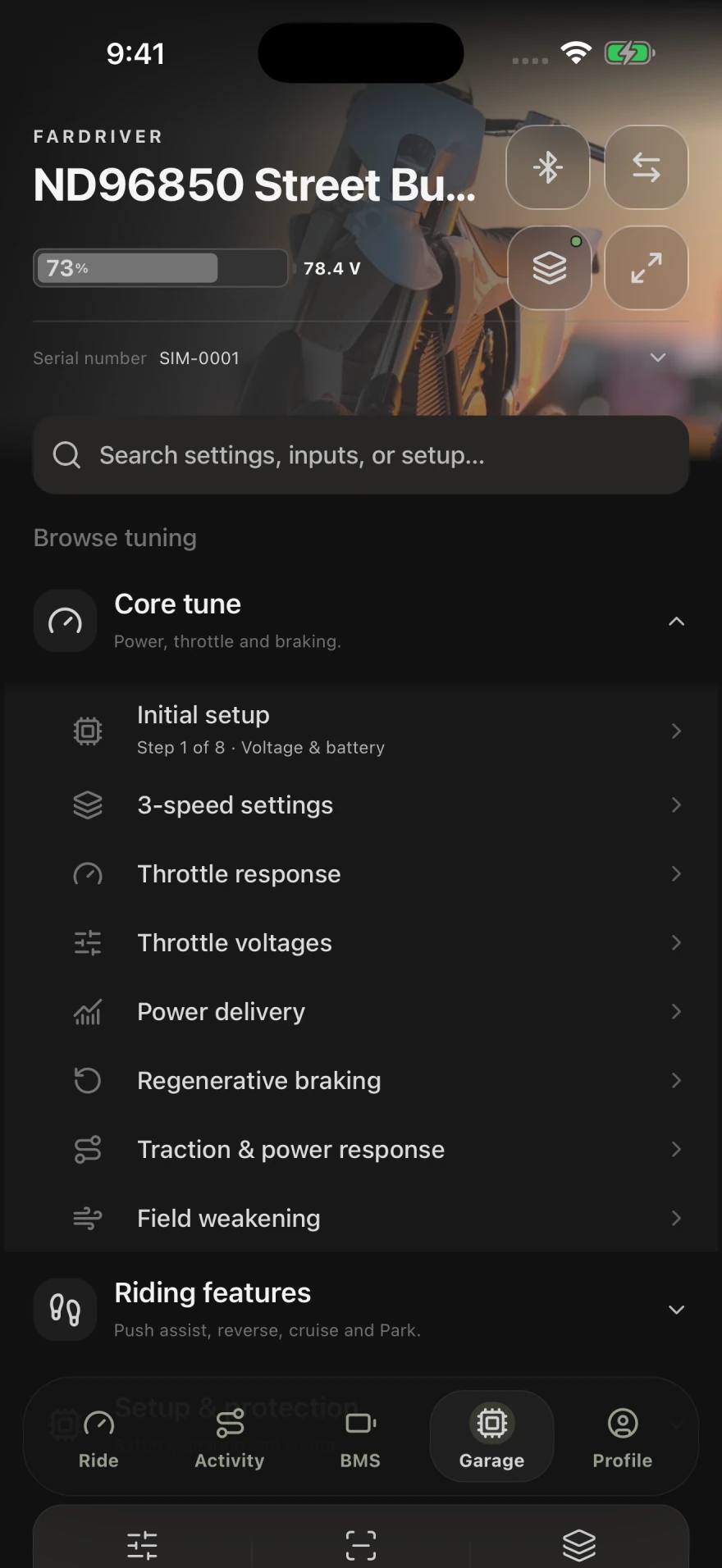
GDriver Garage showing Core tune guides for initial setup, 3-speed settings, throttle, power delivery, regenerative braking, traction, and field weakening
The Garage · Browse tuning guides Actual app · Demo data · Open full size ↗

GDriver is an independent third-party app, not affiliated with or endorsed by FarDriver. The name identifies compatible hardware. Legal & compatibility

01 / IN-APP TUNING GUIDES

New to tuning?
Start with a guide.

Choose what you want to adjust—how the throttle feels, how power builds, or how the vehicle slows down. GDriver brings the relevant settings together with plain-language explanations, visual controls, and the controller’s current values.

A first setup you can follow.

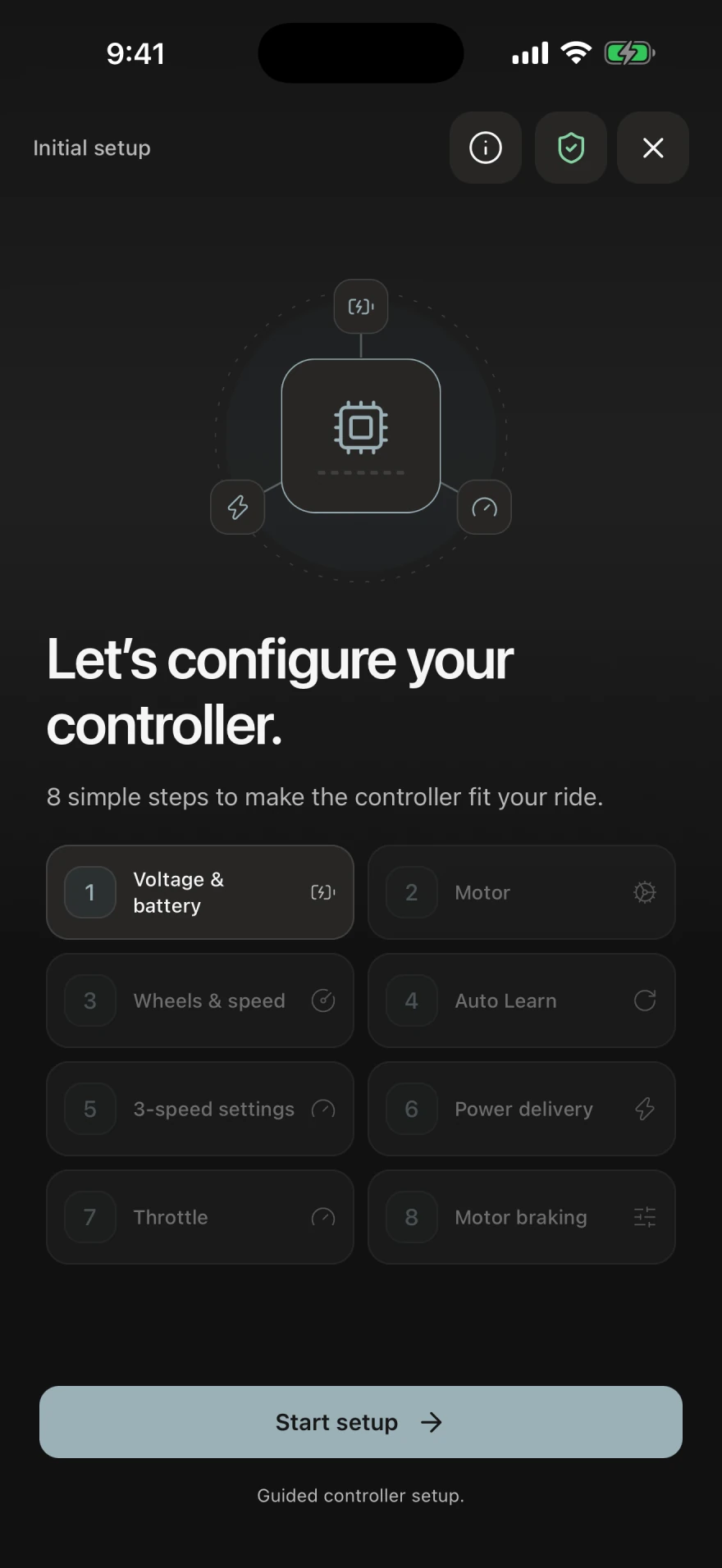
The eight-step Initial setup guide works through battery voltage, motor details, wheels and speed, Auto Learn, 3-speed settings, power delivery, throttle, and motor braking.

  1. Start with your hardware.Enter the battery, motor, wheel, and gearing details for your build.
  2. See what a setting changes.Use the explanations and diagrams as you work through each topic.
  3. Review the result.Check the controller values and test the vehicle’s response before your next adjustment.
Initial setup introduction listing voltage and battery, motor, wheels and speed, Auto Learn, 3-speed settings, power delivery, throttle, and motor braking
Initial setup · Eight guided steps Actual app · Demo data · Open full size ↗
TWO GUIDES, UP CLOSE

Start with the way you want the vehicle to feel.

These are the real controls you’ll use in the app. The example values belong to a demo setup.

EXAMPLE / THROTTLE RESPONSE

Make the response easier to control.

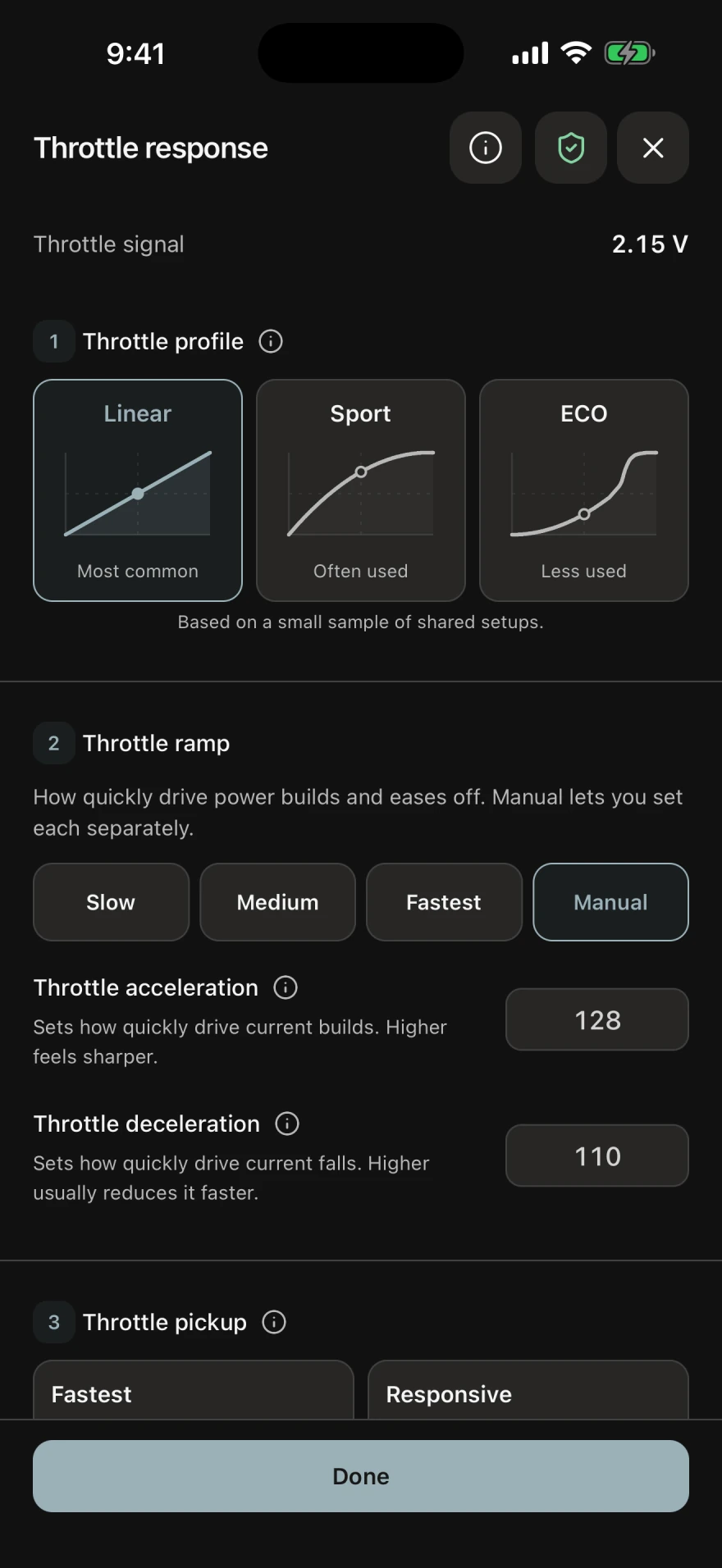
Compare Linear, Sport, and ECO response shapes. Choose a ramp preset, or adjust acceleration and deceleration separately in Manual. The live throttle signal helps you see the input as you work.

A practical starting point: understand how quickly power builds and eases off before changing current limits.

Throttle response guide with live signal voltage, Linear, Sport and ECO curves, ramp presets, and separate acceleration and deceleration controls
Throttle response guide Actual app · Demo data · Open full size ↗
EXAMPLE / POWER DELIVERY

See how power changes with speed.

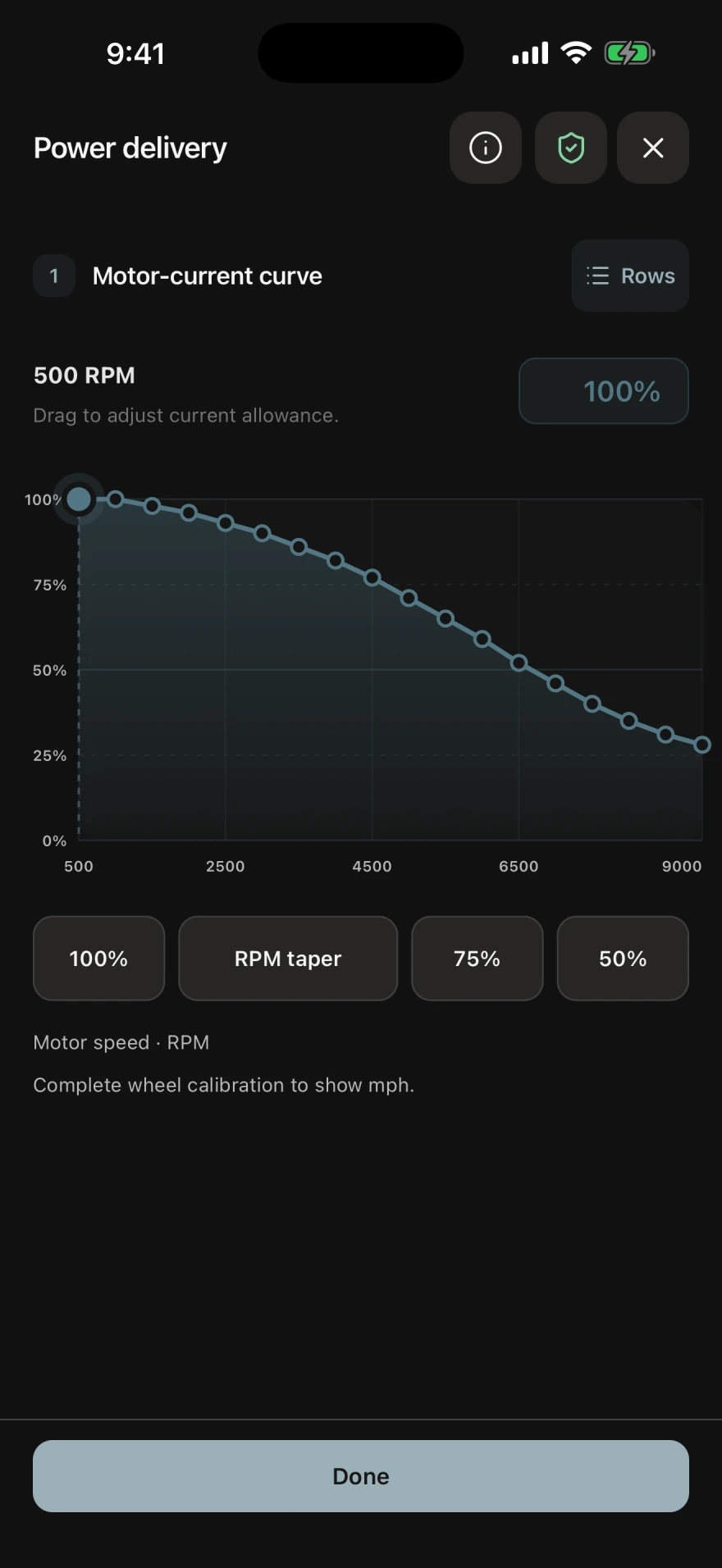
The Power delivery guide shows the motor-current curve visually. Adjust its shape across the speed range, with the relationship between the curve and the controller settings visible on screen.

A practical starting point: review where the curve tapers, then make one deliberate change and compare the ride.

GDriver Power delivery guide with an editable motor-current curve and controls across the speed range
Power delivery guide Actual app · Demo data · Open full size ↗

Core tune

3-speed settings, throttle response and voltages, power delivery, regenerative braking, traction, and field weakening.

Riding features

Push assist, reverse, cruise, Park, boost, speed restriction, and hill hold, with the related inputs and behavior explained.

Setup & protection

Battery setup, low-voltage protection, wheels and gearing, safety inputs, and alarm settings.

Available guides and editable fields depend on the connected controller and its supported functions.

02 / ADVANCED TUNING

The full parameter set.
Organized for deeper work.

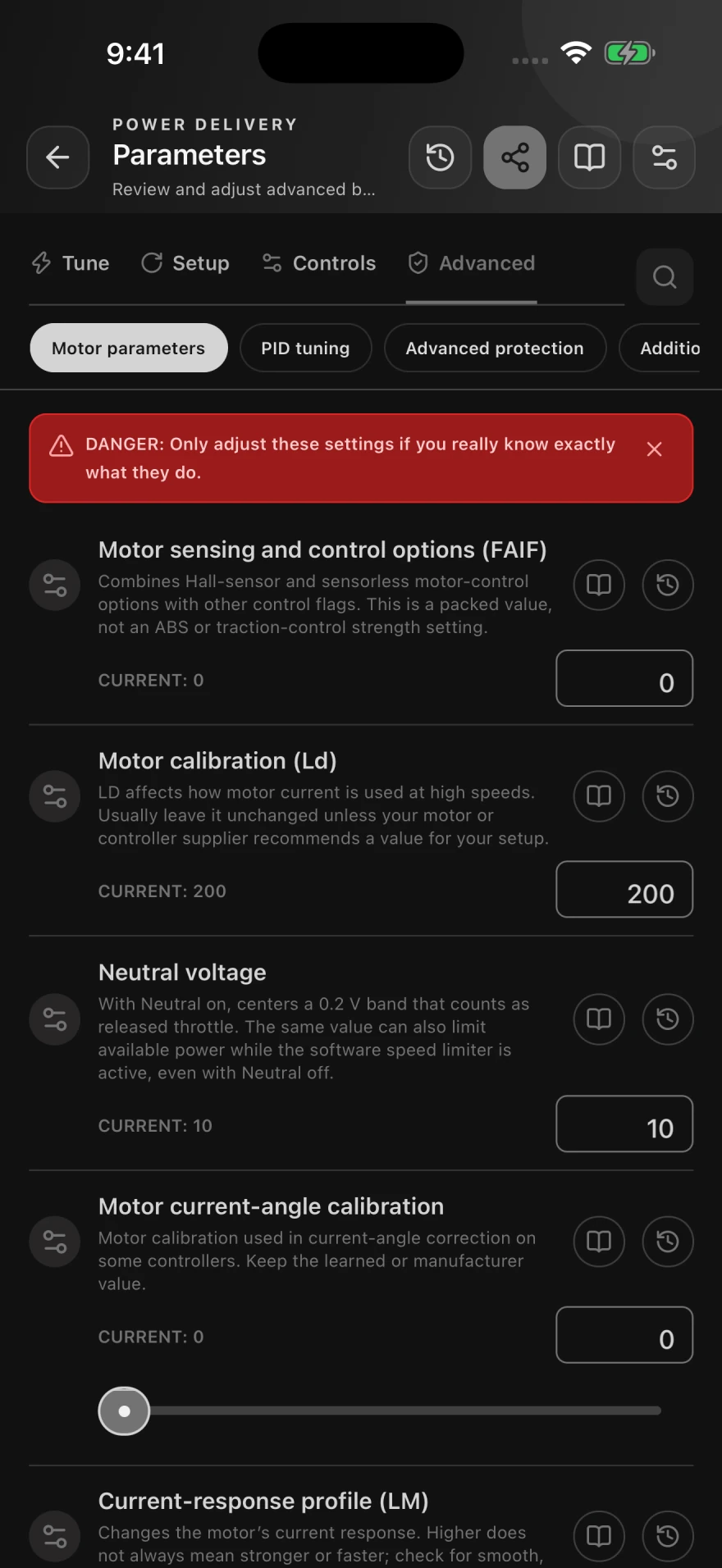
Open Parameters for direct access to the complete set of FarDriver settings supported by GDriver for your controller. Move between Tune, Setup, Controls, and Advanced, or search for the setting you need.

Current values beside your edits
Read the controller’s reported value while working on an adjustment.
Reference material in context
Open a parameter’s explanation from its row, including important interactions and limits.
A history to refer back to
Inspect available value history and share a parameter snapshot when you need another pair of eyes.

The full editor includes specialized motor-control settings. Their presence does not mean every field is writable or has the same effect on every controller.

Advanced parameter editor with Tune, Setup, Controls and Advanced tabs, motor settings, current values, reference links, and history buttons
Parameters · Advanced motor settings Actual app · Demo data · Open full size ↗
TUNE

Power & response

Gear limits, power and regen curves, throttle response, boost, and field weakening.

SETUP

Match the hardware

Battery and motor configuration, wheel and gearing values, and supported sensor settings.

CONTROLS

Inputs & riding features

Switch assignments, braking inputs, reverse, cruise, Park, and other supported controls.

ADVANCED

Motor control & protection

Motor calibration, PID tuning, advanced protection, combined settings, and display parameters.

DIRECT CURVE EDITING

Work with the curve.
Or work with the values.

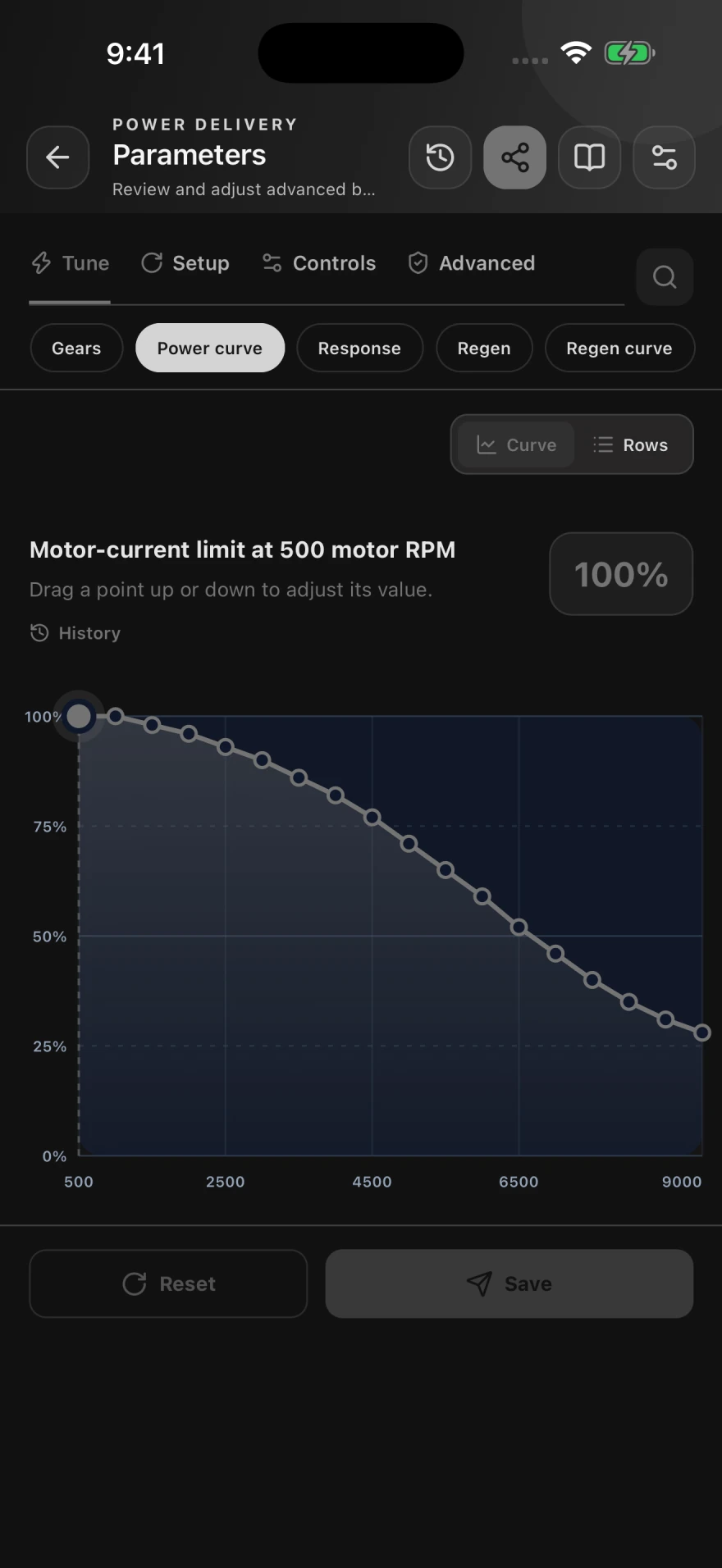
The parameter editor lets you move between a visual curve and individual rows. On the power curve, each point sets a motor-current limit at a motor-RPM breakpoint. Select a point, adjust it, and review the shape before saving.

Use the guided Power delivery view when you want the walkthrough. Use Parameters when you want direct control over the underlying values.

See how to check the result
Full parameter editor showing an adjustable motor-current curve at motor-RPM breakpoints, Curve and Rows controls, and Reset and Save actions
Parameters · Power curve editor Actual app · Demo data · Open full size ↗
TESTED FOR THE WORK THAT MATTERS

Built for confidence
at the controller.

GDriver has undergone extensive testing across controller setup and tuning workflows. That work supports a clear goal: apply the changes you choose, check what the controller reports, and make the outcome understandable.

BEFORE AN EDIT

Start from the controller.

Current controller values and connection state provide the context for a supported edit. The app checks availability and the conditions required for the operation.

WHEN YOU MAKE A CHANGE

Keep the change deliberate.

Input validation, parameter explanations, and focused guide controls help you send the intended settings and understand their effect.

AFTER THE CHANGE

Know what was confirmed.

GDriver checks controller responses and reports adjustments, rejected changes, or unconfirmed results. Confirmation and saved-state feedback help you see what still needs attention.

Confidence comes from clear controls and clear results. Choose values appropriate for your battery, motor, controller, and vehicle, and verify the vehicle’s behavior after a change.

Read rider reviews
03 / PROFILES & BACKUPS

Keep the tunes
you want to return to.

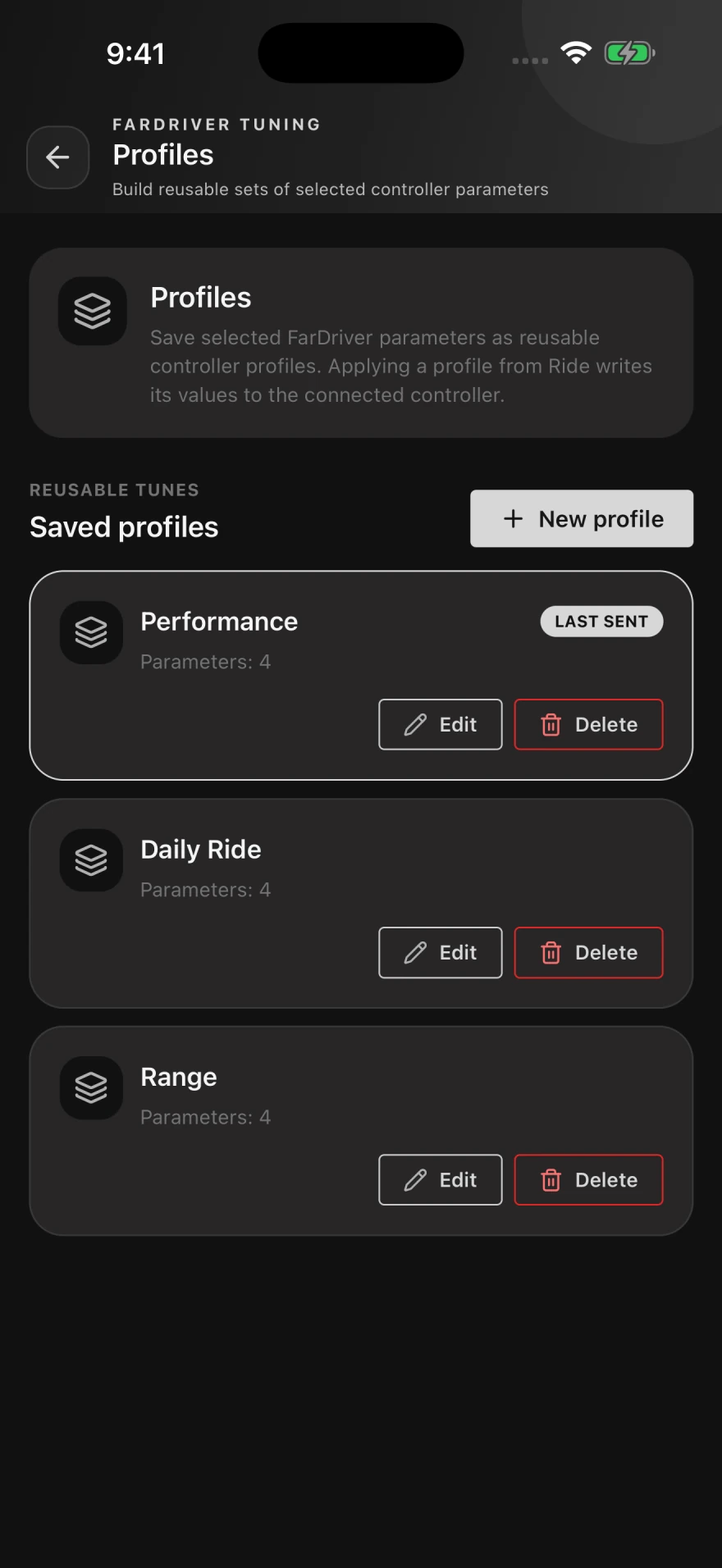
Build named profiles from selected controller parameters. Keep a daily setup, a range-focused setup, or a configuration you’re testing, and choose a saved profile from the Ride screen to send its values.

Choose what belongs in each profile
A profile can contain the settings you want to reuse, with its own name and values.
Keep a settings backup as well
Backup & restore manages controller snapshots and supported HEB imports and exports.
Review before applying
Sending a profile changes controller settings. Check it against the connected controller and the limits of its hardware.
Saved FarDriver profiles named Performance, Daily Ride and Range, each with a parameter count and edit controls
Profiles · Reusable controller settings Actual app · Demo data · Open full size ↗
04 / LIVE DIAGNOSTICS

See what the
controller is doing.

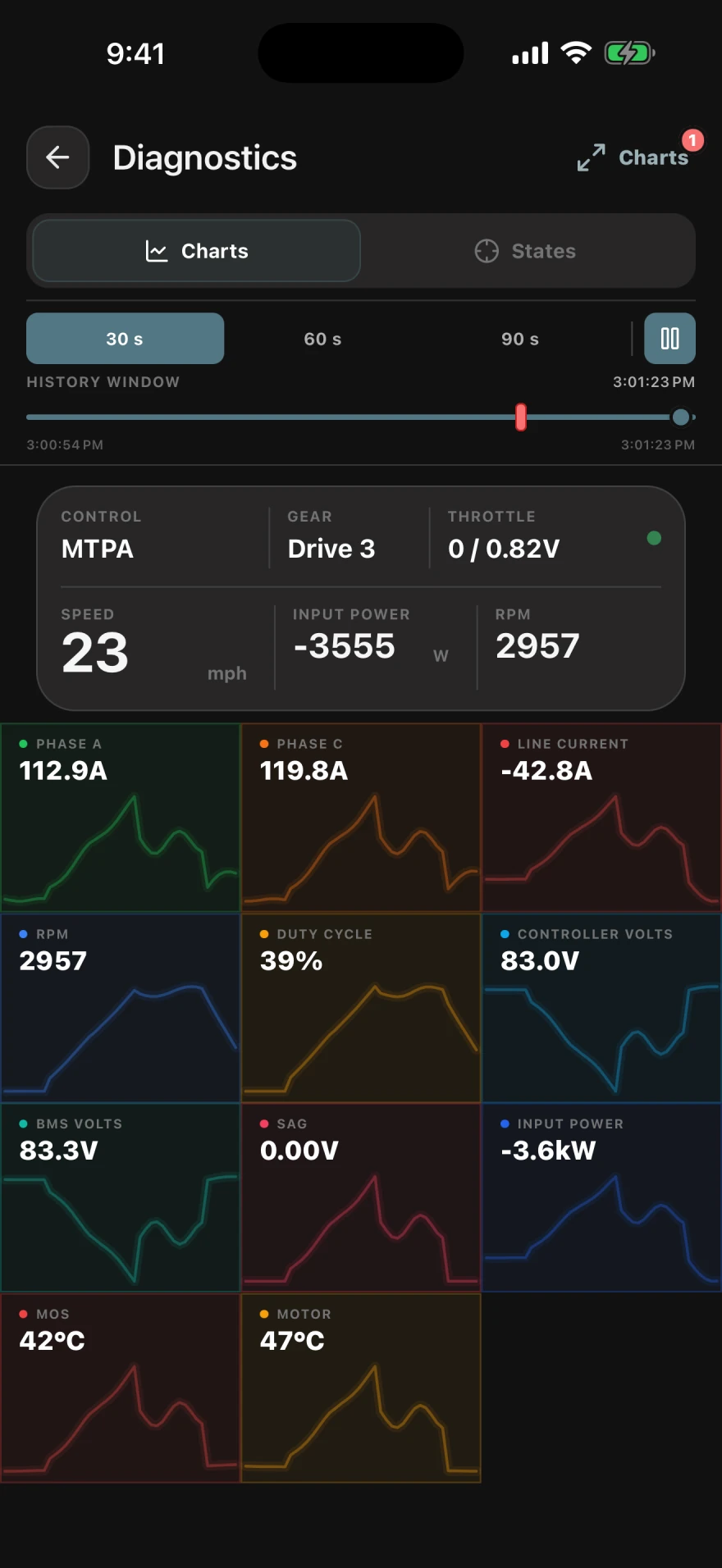
Bring the electrical signals, motor behavior, controller states, and reported faults into one diagnostic workspace. Follow a change over time and inspect the signals around it.

Electrical and thermal context
Follow available voltage, current, power, speed, and temperature readings. Compare voltage changes with current draw.
States as well as numbers
Check the controller’s reported operating states and inputs while investigating a behavior.
Faults on the timeline
Select a reported fault event to inspect the signals around that moment.
Trouble connecting? Run the browser diagnostic
GDriver Diagnostics showing controller signal charts and the timeline for inspecting live data
Diagnostics · Live signals and faults Actual app · Demo data · Open full size ↗
05 / FIRMWARE UPGRADES

Firmware tools.
Settings kept in view.

Install a FarDriver firmware file supplied for your exact controller through Backup, restore & firmware. GDriver checks the package format, saves settings before transfer, and reports progress on supported connections.

  1. 01

    Choose the supplied file

    Select the controller’s .bin firmware package and confirm it was supplied for that controller. A format check alone does not establish hardware compatibility.

  2. 02

    Preserve the settings

    GDriver saves a fresh settings backup before starting. On the legacy protocol, it exports a reference of the settings; that file cannot restore them automatically.

  3. 03

    Update and reconnect

    Keep power on and the phone nearby as the transfer proceeds. The app checks the controller’s return before reporting completion. Review settings before riding.

Availability follows the connection. Firmware updates require a supported controller and app build, a stopped motor, and the required controller authorization. Use the file provided by your controller supplier.

Seeing “controller version too low”?
06 / TELEMETRY & RIDE REVIEW

Take the tune
out on the road.

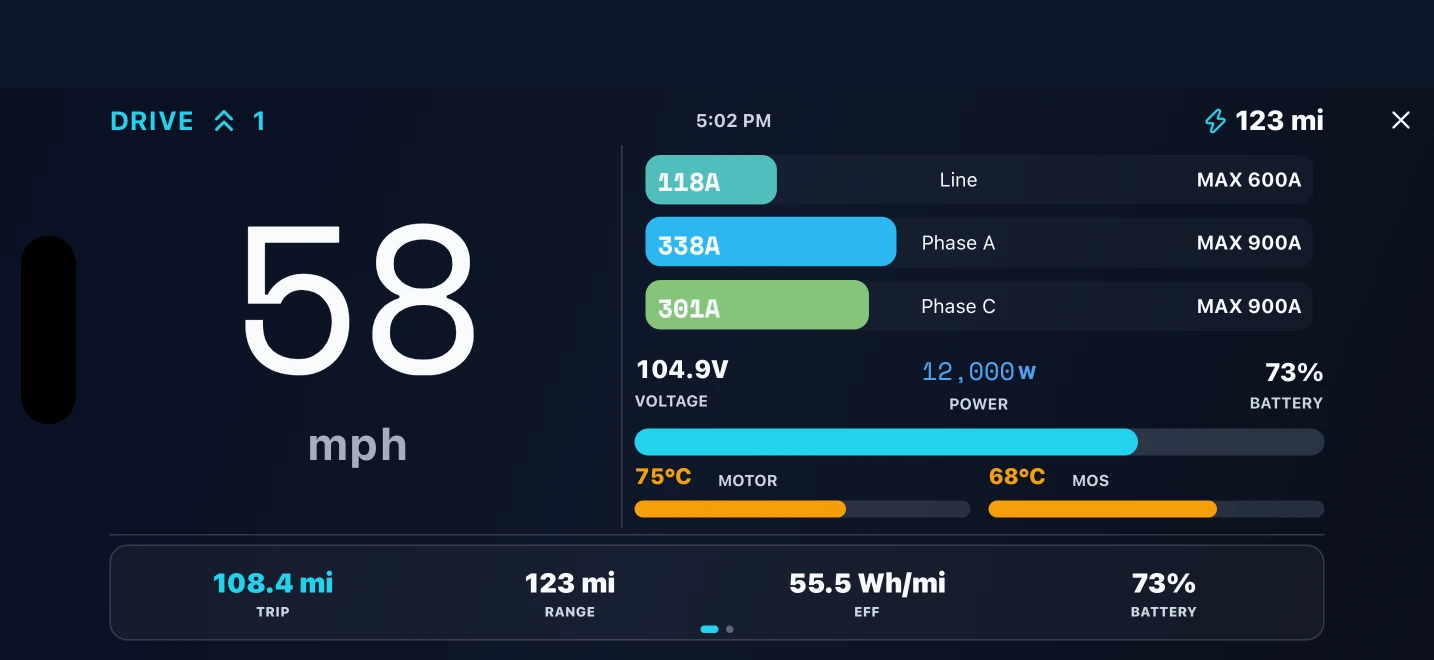
Use a full-screen dashboard for the live ride, then return to the route and recorded measurements afterward. Keep speed, electrical load, and ride duration in the same conversation as your tuning decisions.

Live dashboards
Choose a display for the available controller and GPS signals, including a landscape Racing HUD.
Pro trip replay
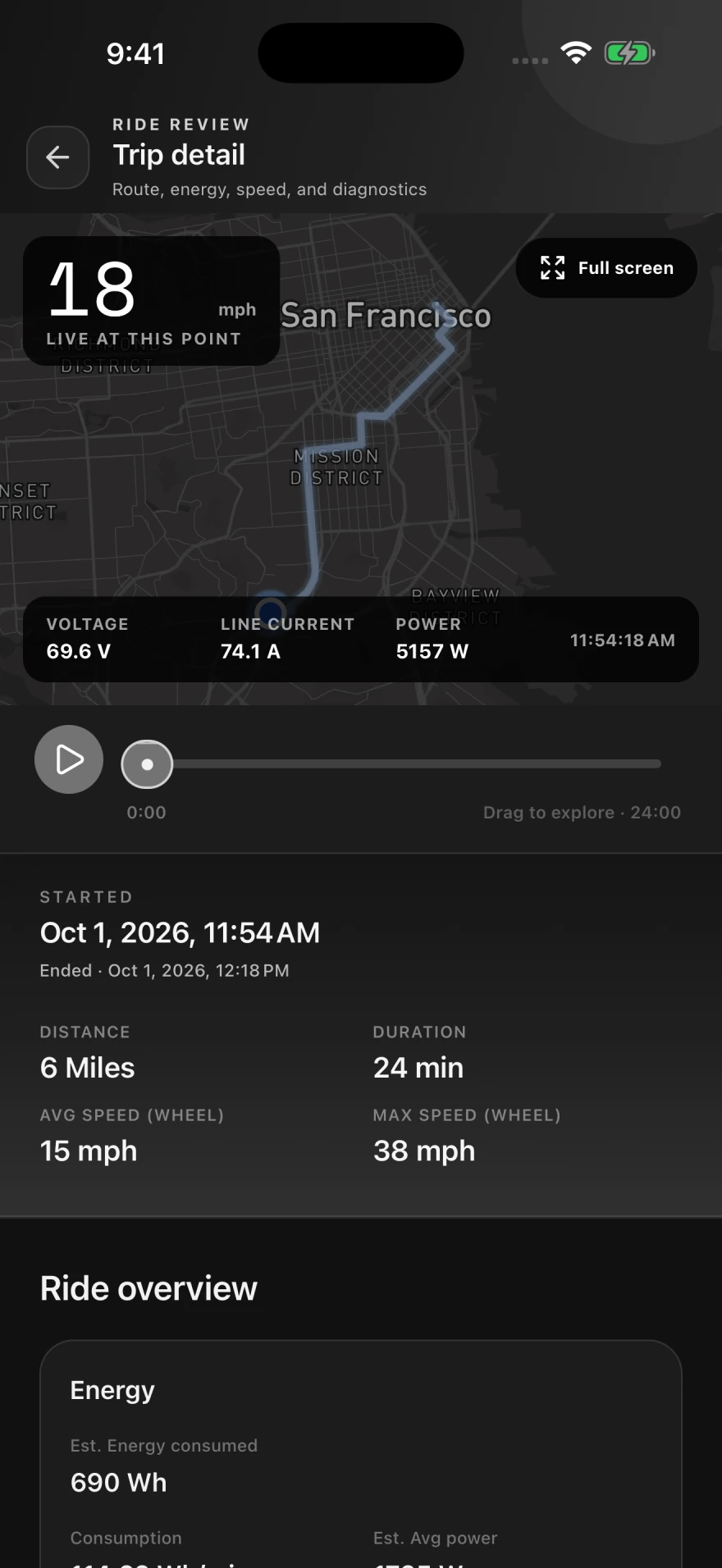
Move through a recorded ride to see the route alongside speed, voltage, current, and power at that point.
A ride summary to compare
Review distance, time, average and maximum speed, and supported energy estimates.

The trip capture shows GDriver Pro with demo ride data. Pro features require an in-app purchase; recorded signals depend on your hardware and permissions.

Unlocked GDriver Pro Trip detail with route, visible speed, voltage, current, power, playback timeline, and ride summary
Trip detail · GDriver Pro replay Actual app · Demo data · Open full size ↗
Landscape GDriver Racing HUD showing ride speed and live telemetry
Racing HUD · Live ride display Actual app · Demo data · Open full size ↗
COMPATIBILITY WITHOUT GUESSWORK

Your exact controller decides what is available.

“FarDriver compatible” does not mean every function is identical on every controller. Model, hardware revision, firmware, Bluetooth module, vehicle, region, and protocol can change which values are exposed and writable. GDriver identifies the connection and presents the supported tools available for that setup.

Test a FarDriver Bluetooth connection
Bluetooth connectionCompatible module required
Parameter read and writeModel and firmware dependent
Auto LearnShown when supported
Telemetry channelsAvailable signals vary
BMS informationSupported hardware required
GPS ride trackingPhone capability and permission required
CHANGE WITH EVIDENCE

A safer way to approach controller tuning.

Controller settings can affect acceleration, braking, temperature, reliability, and vehicle behavior. Software cannot determine the safe electrical or mechanical limit of an unknown build.

  1. 01

    Preserve the known-good setup

    Read the controller and save supported settings before making a change.

  2. 02

    Confirm the hardware limits

    Know the battery, BMS, controller, motor, wiring, gearing, and cooling limits.

  3. 03

    Change one thing at a time

    Use small steps, verify written values, and keep the drive wheel secured during setup.

  4. 04

    Test before normal riding

    Begin in a controlled area and watch current, voltage, temperature, braking, and faults.

FREQUENTLY ASKED QUESTIONS

Clear answers before you connect.

For a model-specific question, include the complete controller model, firmware identifier, Bluetooth module, motor, battery voltage, and the exact symptom.

Is GDriver made by or affiliated with FarDriver?

No. GDriver is independently developed and is not affiliated with, endorsed by, sponsored by, or an official product of FarDriver. The name identifies compatible third-party hardware.

Which FarDriver controllers work with GDriver?

Compatibility and features depend on the controller model, hardware revision, firmware, Bluetooth module, vehicle, region, and protocol. GDriver identifies the connected controller and exposes the supported data and tools available for that setup.

Can GDriver change controller settings?

On compatible controllers, GDriver can read and edit supported parameters. The exact fields and editing access vary by model, firmware, controller state, and authorization.

Does GDriver support Auto Learn?

GDriver provides Auto Learn workflows for supported controllers. Secure the vehicle with the drive wheel fully off the ground and follow the displayed safety instructions before starting.

Can I test the Bluetooth connection first?

Yes. The browser-based diagnostic can safely test a compatible module, controller communication, maintenance-load reliability, authorization state, and editing availability without writing controller parameters.

Can I save the current tune?

GDriver can save reusable profiles from supported controller parameters. Preserve a known-good setup before editing and make one group of changes at a time.

Does it record rides and live data?

Yes. Depending on the connected hardware, GDriver can display supported controller, battery, and GPS signals and record routes and ride metrics for later review.

Why choose GDriver for a FarDriver controller?

GDriver combines beginner-friendly tuning guides with the full supported FarDriver parameter set, in-context parameter explanations and history, visual curve editing, reusable profiles, backups, live diagnostics, firmware file upgrades, and ride review. It is available on Android, iPhone, and iPad, so you can start with guided setup and use deeper tools as your needs grow.

How does GDriver help me trust a controller edit?

GDriver has undergone extensive testing across controller setup and tuning workflows. It uses current controller information, validates supported edits, and checks controller responses. Adjusted, rejected, or unconfirmed results are surfaced so you can understand the outcome. Settings must still suit your hardware and be checked before riding.

Where should a new user start?

Start in Garage with Initial setup, then use a focused tuning guide for the behavior you want to adjust. Guides cover topics such as throttle response, power delivery, regenerative braking, battery setup, and riding features.

Can I access the full FarDriver parameter set?

Parameters exposes the complete set of FarDriver settings supported by GDriver for the connected controller, grouped into Tune, Setup, Controls, and Advanced. Available fields and write access depend on the controller and its reported capabilities.

Can GDriver upgrade FarDriver firmware?

On supported connections, use Backup, restore & firmware to select a .bin file supplied for your exact controller. GDriver checks its format and saves settings before the update. Legacy controllers receive a settings reference export that cannot restore values automatically. Keep power on, allow the controller to reconnect, and check settings afterward.

Where can I download GDriver?

GDriver is available as a free download from Google Play for Android and from the App Store for iPhone and iPad. Optional in-app purchases are available.

GDRIVER FOR COMPATIBLE FARDRIVER CONTROLLERS

Keep the setup and the ride in the same place.

Start with a tuning guide. Build confidence with the live values. Explore the deeper tools as you need them.

Changing controller settings can affect vehicle behavior. Verify every value and test changes carefully before riding.